Blog
3D Perception: a LiDAR-Camera Pipeline — Part 5: Merging 2D Intelligence and 3D Depth with Frustum Fusion
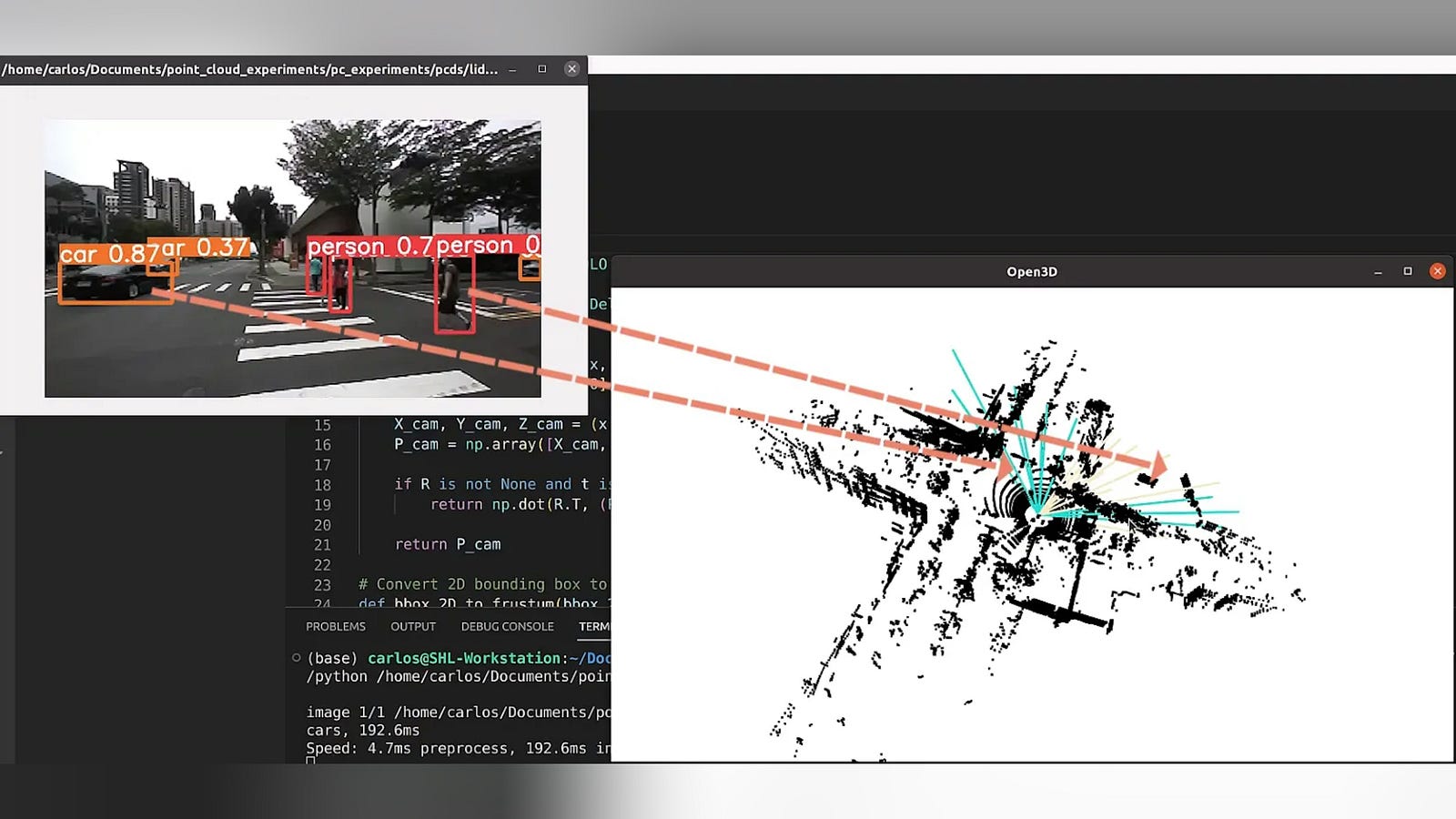
This article is part of a hands-on series building a 3D Perception Pipeline with ROS 2 Jazzy. In modern robotics, seeing isn’t enough — robots need spatial intelligence to locate objects in a 3D world.
The Project: We are building a unified system that fuses 3D LiDAR and ZED2 stereo camera data using YOLO for detection and Open3D for point cloud processing. Everything is managed via Pixi, making the environment reproducible on different systems.
The Series: These modular lessons collectively form a full end-to-end project. You can follow the step-by-step roadmap or jump into specific sensor logic as needed.
The Roadmap
Make sure to read the first 3 articles before this one.
3D Perception: a LiDAR-Camera Pipeline — Part 1: Setting Up Your Development Environment
3D Perception: a LiDAR-Camera Pipeline - Part 2: The ROS 2 Graph & Perception Data Flow
3D Perception: a LiDAR-Camera Pipeline - Part 3: 3D Point Cloud Processing & Clustering
3D Perception: a LiDAR-Camera Pipeline - Part 4: 2D Camera Detections with YOLO
3D Perception: a LiDAR-Camera Pipeline - Part 6: Projecting 3D Intelligence into a 2D Map as a…
In previous articles, we had two separate streams: a list of 2D bounding boxes and a cloud of 3D clusters. Now, we implement Frustum Fusion. By projecting our 3D LiDAR clusters onto the 2D camera plane, we can mathematically “ask” which 3D object matches which 2D detection. This allows the robot to say: “That group of laser points isn’t just an unidentified obstacle; it’s the specific car YOLO identified at these pixel coordinates”.
Learning Objectives
By the end of this lesson, you will be able to:
- Master Temporal Synchronization: Use
message_filtersto align data from sensors with different frame rates. - Navigate the TF2 Transform Tree: Programmatically look up the spatial relationship between a LiDAR and an Optical Camera frame.
- Implement the Pinhole Projection: Use an Intrinsic Camera Matrix (K) to project 3D coordinates into 2D pixel space.
- Apply Geometric Association: Match objects across different sensor modalities using Euclidean distance and pixel-space search radii.
- Generate Semantic 3D Detections: Produce a unified
Detection3DArraywhere each physical cluster is tagged with an AI-generated label.
We will now look at the code section by section.
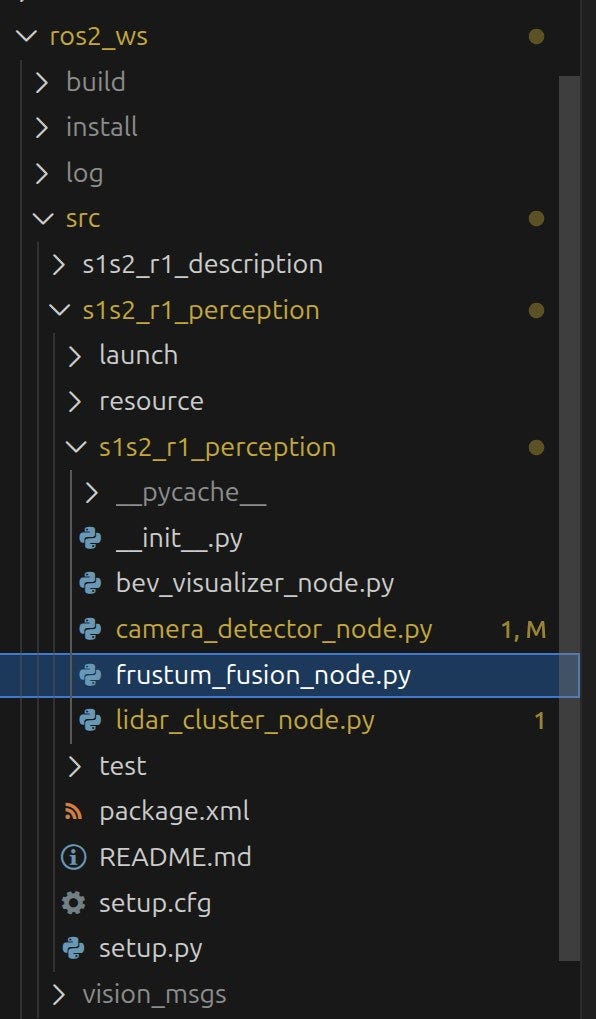
Part 1: The Import Section
This block brings in the “math and coordination” tools needed to align two different sensor perspectives.
import rclpy
from rclpy.node import Node
from vision_msgs.msg import Detection3DArray, Detection2DArray, ObjectHypothesisWithPose
from geometry_msgs.msg import PointStamped
import tf2_ros
import tf2_geometry_msgs
import numpy as np
import message_filters- rclpy & Node: The foundation for any ROS 2 Python script.
- Vision Messages: We use
Detection3DArray(from LiDAR) andDetection2DArray(from YOLO) as our inputs. - TF2 Stack:
tf2_rosandtf2_geometry_msgsallow us to calculate the spatial offset between the LiDAR and the Camera. - Message Filters: This is the “glue” that ensures we only process LiDAR and Camera data that share a nearly identical timestamp.
Part 2: Node Initialization & Parameters
This is where we define the node and establish the “Identity” of our sensors.
class FrustumFusionNode(Node):
    def __init__(self):
        super().__init__('frustum_fusion_node')

        # Parameters
        self.declare_parameter('lidar_frame', 'rslidar')
        self.declare_parameter('camera_frame', 'zed2_left_camera_optical_frame')
        self.declare_parameter('match_radius', 50.0) # Search radius in pixels

        self.lidar_frame = self.get_parameter('lidar_frame').value
        self.camera_frame = self.get_parameter('camera_frame').value
self.match_radius = self.get_parameter('match_radius').value- The Frames: We define
lidar_frameandcamera_frameso the Transform (TF2) system knows exactly which two coordinate systems to bridge. - Match Radius: This is a crucial “tuning knob.” It defines how many pixels of distance we allow between a projected LiDAR point and a YOLO box center before we consider them a match.
Part 3: Spatial and Temporal Synchronization
Before doing math, we must ensure the sensors are aligned in time and space.
        # TF2 buffer and listener
        self.tf_buffer = tf2_ros.Buffer()
        self.tf_listener = tf2_ros.TransformListener(self.tf_buffer, self)

        # Camera intrinsics matrix K
        self.K = np.array([
            [267.0,   0.0, 320.0],
            [  0.0, 267.0, 180.0],
            [  0.0,   0.0,   1.0]
        ])
        # Synchronized Subscriptions
        self.lidar_sub = message_filters.Subscriber(self, Detection3DArray, '/detection/lidar_clusters')
        self.camera_sub = message_filters.Subscriber(self, Detection2DArray, '/detection/camera_2d')

        # Use approximate sync since timestamps might not be identical in bag files
        self.sync = message_filters.ApproximateTimeSynchronizer([self.lidar_sub, self.camera_sub], 10, 0.1)
self.sync.registerCallback(self.fused_callback)- The TF2 Buffer and Listener act as the spatial memory of your robot. The Listener constantly monitors the network for transform broadcasts, while the Buffer stores a rolling history of these coordinate relationships. This setup allows the node to perform a “spatial lookup” to find the exact translation and rotation between the LiDAR and Camera frames at the specific microsecond at which a data packet was captured.
- The K Matrix: This intrinsic matrix contains the focal length and optical center of our camera sensor, allowing us to project 3D points onto a 2D plane.
- ApproximateTimeSynchronizer: Because LiDAR and Cameras have different frame rates, this waits until it finds two messages within 0.1 seconds of each other before triggering the fusion logic.
Part 4: The Output and Confirmation
To wrap up the initialization, we define the output “pipe” and confirm the node’s status:
        # Publisher
        self.fused_pub = self.create_publisher(Detection3DArray, '/detection/fused_3d', 10)

self.get_logger().info('Frustum Fusion Node started.')- The Fused Publisher: This creates the final output stream of our entire pipeline. It sends out a
Detection3DArrayto the/detection/fused_3dtopic. Unlike the previous nodes, these 3D boxes are now “intelligent”—they contain the precise (x, y, z) coordinates from the LiDAR and the semantic labels (like “Car” or “Pedestrian”) from the Camera. - The Startup Log:
self.get_logger().infoprovides immediate feedback in your terminal that the node has initialized its parameters, buffers, and synchronized subscriptions correctly.
Part 5: The Fusion Callback & Coordinate Transformation
This function executes for every synchronized pair of data.
    def fused_callback(self, lidar_msg, camera_msg):
        # Live-update parameters from the ROS 2 server
        self.match_radius = self.get_parameter('match_radius').value

        if self.K is None:
            self.get_logger().warn('No camera info received yet.')
            return
        # Look up transform from Lidar to Camera
        try:
            transform = self.tf_buffer.lookup_transform(
                self.camera_frame,
                lidar_msg.header.frame_id,
                lidar_msg.header.stamp,
                rclpy.duration.Duration(seconds=0.1))
        except Exception as e:
            self.get_logger().error(f'Could not lookup transform: {e}')
return- Transform Lookup: We ask the system for the exact translation and rotation between the sensors at the specific moment the data was captured. If the robot is moving, this ensures the points and pixels still line up.
Part 6: The Spatial Transformation (3D to 3D)
Before we can project a point onto an image, it must be represented in the camera’s coordinate system.
        fused_detections = Detection3DArray()
        fused_detections.header = lidar_msg.header

        for det_3d in lidar_msg.detections:
            # 1. Transform centroid to camera frame
            point_lidar = PointStamped()
            point_lidar.header = lidar_msg.header
            point_lidar.point = det_3d.bbox.center.position

            point_cam = tf2_geometry_msgs.do_transform_point(point_lidar, transform)
            # Check if point is in front of camera
            if point_cam.point.z <= 0:
continue- Coordinate Shift: We take the 3D center (centroid) of a LiDAR cluster and use the
do_transform_pointfunction to “move” it from the LiDAR’s frame (top-center of the robot) to the Camera’s optical frame (the lens). - The Z-Axis Gatekeeper: In the camera’s coordinate system, the Z-axis points straight out of the lens. If Z <= 0, the object is either behind the camera or exactly on the lens surface. We
continueto skip these points, as they cannot be seen in the image.
Part 7: The Perspective Projection (3D to 2D)
Now that the point is positioned relative to the lens, we calculate exactly which pixel (u, v) it occupies.
            # 2. Project onto 2D plane
            p_cam = np.array([point_cam.point.x, point_cam.point.y, point_cam.point.z])
            p_img = self.K @ p_cam
            u = p_img[0] / p_img[2]
            v = p_img[1] / p_img[2]
To turn a 3D point into a 2D pixel, we use the Pinhole Camera Model. This is the mathematical bridge that allows the robot to “see” where a LiDAR cluster would appear on the camera’s sensor.
The Mathematical Projection
The code executes a linear transformation followed by a perspective normalization. This is represented by the following formula:
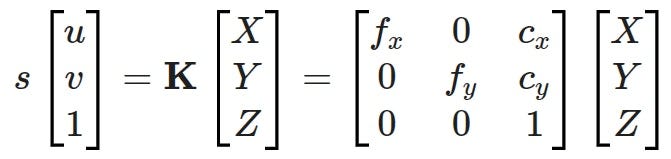
Matrix Multiplication (self.K @ p_cam): We multiply the Intrinsic Matrix K by the 3D point coordinates (X, Y, Z). This shifts the point from the 3D camera coordinate system into a 2D “image plane” coordinate system.
- f_x, f_y (Focal Length): These scale the 3D coordinates based on the lens’s magnification.
- c_x, c_y (Principal Point): These shift the (0,0) origin from the top-left corner to the actual optical center of the sensor.
- s (Scale Factor): A scale factor that, in this specific model, is equal to the depth Z of the point from the camera.
Perspective Division (p_img[0] / p_img[2]):
The result of the matrix multiplication gives us “homogeneous” coordinates. To get the final pixel locations (u for horizontal, v for vertical), we must divide by the depth Z (which is p_img[2]).
- Why divide? In a camera, objects that are further away (larger Z) appear smaller and closer to the center. Dividing by Z creates this “3D perspective” effect.
The Result:
The final u and v values are the exact pixel coordinates on the 640 x 360 image where the center of the LiDAR cluster is located. We can now compare these directly to the bounding boxes provided by YOLO.
Part 8: The Euclidean Distance Match
Now that we know exactly where our 3D cluster “lands” on the 2D image, we need to find the closest YOLO bounding box.
            # 3. Match with 2D detections
            best_match = None
            min_dist = self.match_radius

            for det_2d in camera_msg.detections:
                u_2d = det_2d.bbox.center.position.x
                v_2d = det_2d.bbox.center.position.y

                dist = np.sqrt((u - u_2d)**2 + (v - v_2d)**2)
                if dist < min_dist:
                    min_dist = dist
best_match = det_2d- Pixel-Space Search: We iterate through every 2D detection produced by YOLO.
- The “Nearest Neighbor” Logic: We calculate the straight-line distance between our projected LiDAR point (u, v) and the center of the YOLO box (u_2d, v_2d).
- The Match Radius: If the distance is smaller than our
match_radius(e.g., 50 pixels), we consider this a successful match. If multiple boxes are nearby, we select the one with the smallest distance.
Part 9: Merging the Metadata
Once a match is confirmed, we “decorate” our 3D LiDAR cluster with the AI’s classification data.
            # 4. Update 3D detection with class if matched
            hypothesis = det_3d.results[0] if det_3d.results else ObjectHypothesisWithPose()
            if best_match is not None:
                det_fused = det_3d # Use the original 3D spatial data
                # Map YOLO class results
                for res_2d in best_match.results:
                    hypothesis.hypothesis.class_id = res_2d.hypothesis.class_id
                    hypothesis.hypothesis.score = res_2d.hypothesis.score

                    # Attach the semantic identity to the 3D cluster
                    det_fused.results.append(hypothesis)

                # Add to the final list of fused objects
                fused_detections.detections.append(det_fused)

self.fused_pub.publish(fused_detections)- The “Smart” Cluster: We take the original 3D bounding box (the physical “where”) and append the YOLO
class_id(the semantic “what”) and thescore(the AI’s confidence). - Filtering by Match: In this specific implementation, we only publish 3D clusters that have been successfully matched to a 2D detection. This ensures our final output consists only of high-confidence, identified objects.
- Final Output: The
fused_detectionsarray is now ready to be published, providing a unified view of the environment where every car, pedestrian, or obstacle is tracked in full 3D space with its AI label attached.
Part 10: The Main Entry Point (main)
Finally, the standard “boilerplate” that starts the node.
def main(args=None):
    rclpy.init(args=args)
    node = FrustumFusionNode()
    rclpy.spin(node)
    node.destroy_node()
    rclpy.shutdown()

if __name__ == '__main__':
    main()
Now that we understand how the code works and can see it running, let’s explore how the match_radius parameter affects the output of our fusion. Use the commands below to change the parameter value and see how this affects the number of detections projected onto the BEV image.
# This setting should reduce the number of overlaid detections
ros2 param set /frustum_fusion_node match_radius 10.0

# This setting should increase the number of overlaid detections
ros2 param set /frustum_fusion_node match_radius 100.0Also published on Medium.